
At some point I counted. Twenty-seven Claude Code sessions alive on my Mac, across twelve repos. Some were halfway through a refactor. Some had finished an hour ago and were waiting for me to read the answer. A few were from last week and I had forgotten they existed.
The problem was not Claude. The problem was that I had become the scheduler for a small team, and I had no board.
tmux came first
Before there was a deck, there was tmux.
tmux is a terminal multiplexer: one terminal that holds many shells. Each shell lives in a window, and the windows keep running when you close the terminal app. You detach, go get lunch, attach again, and everything is where you left it.
That’s exactly what long-running agents need. So I stopped opening a new terminal tab for every Claude session and started running all of them inside one tmux session called claude, one window per agent. A tiny wrapper, cc, does it for me: from any repo, cc opens a new tmux window named after the folder and starts Claude in it.
cd ~/work/checkout-api && cc   # new window "checkout-api", Claude running inside
tmux attach -t claude          # all of them, any time, from any terminal
This fixed half the problem. Sessions stopped dying when I closed a tab. ctrl-b w gave me a list of every agent by name. Nothing got lost anymore.
It didn’t fix the other half. tmux knows a window’s name, not what’s happening inside it. The list couldn’t tell me which session was working, which was waiting on me, or which had finished twenty minutes ago with a question I never saw. I still had to open each window and read the scrollback.
The part of tmux nobody talks about
Then it clicked that tmux is fully scriptable. Anything you do with the keyboard, a script can do too:
tmux send-keystypes into any window, as if you were sitting there.tmux capture-panereads what any window is showing right now.tmux select-windowbrings any window to the front.
And Claude Code, it turns out, writes everything down. Each running session has a small JSON file in ~/.claude/sessions/ with its process id, folder and status. Every prompt goes into ~/.claude/history.jsonl. Every conversation is a transcript under ~/.claude/projects/.
Put those two together and the missing piece is obvious. The files tell you what each session is doing. tmux lets you reach into each one. All that’s left is a page that reads the first and drives the second.
tmux gave every agent an address. The deck is just a page that knows all the addresses.
What it turned into
The Control Deck is a local web page. Repos on the left, grouped into Work and Personal, favourites pinned on top. The selected repo’s sessions are tabs, each with a coloured dot: green live, amber working, red stale, grey closed.
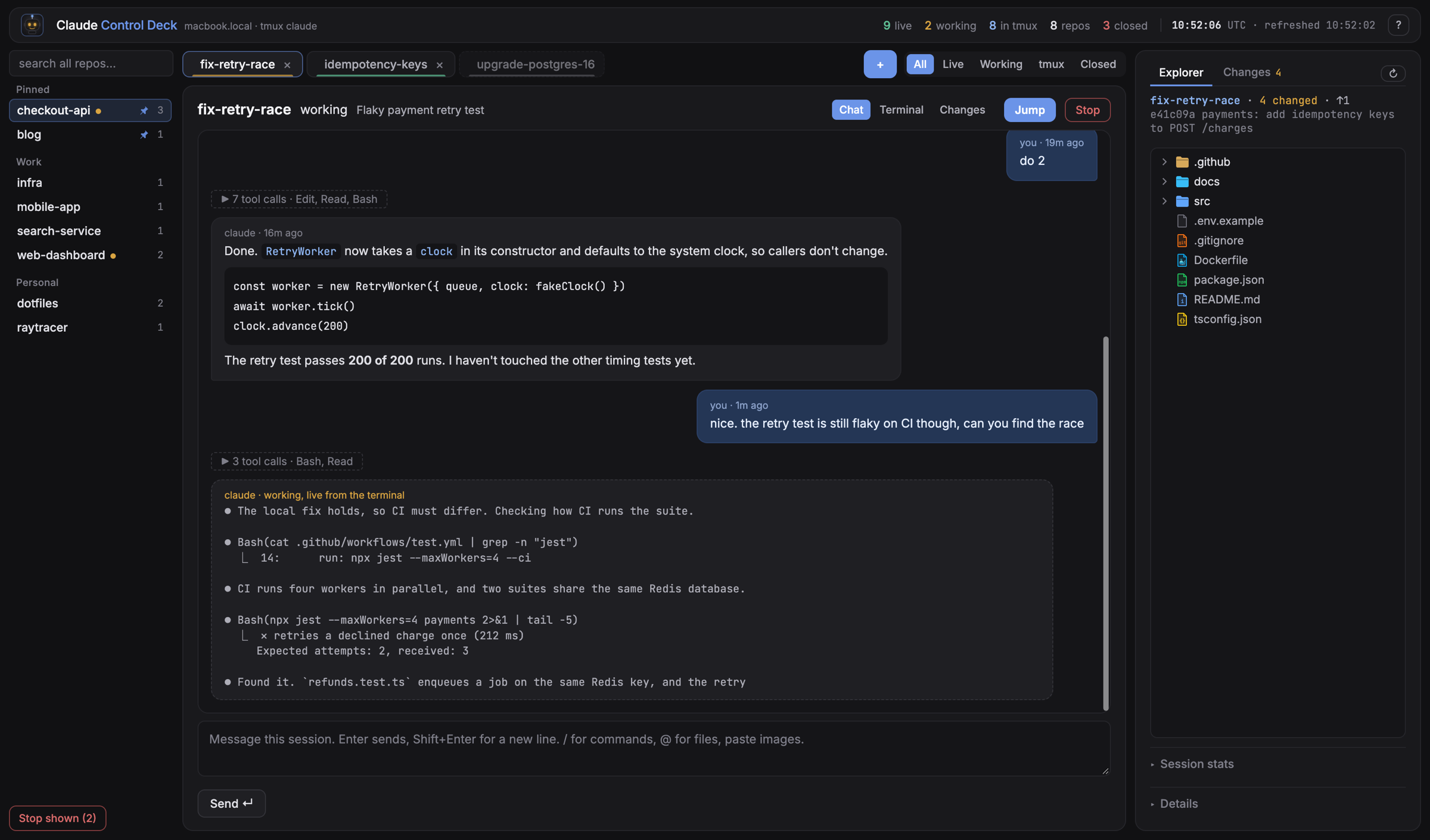
The middle is the session itself:
- Chat. The whole conversation, rendered and scrollable. While Claude is replying, a live bubble shows what the terminal is printing, so I’m not staring at a spinner.
- Terminal. The real tmux pane, inside the page.
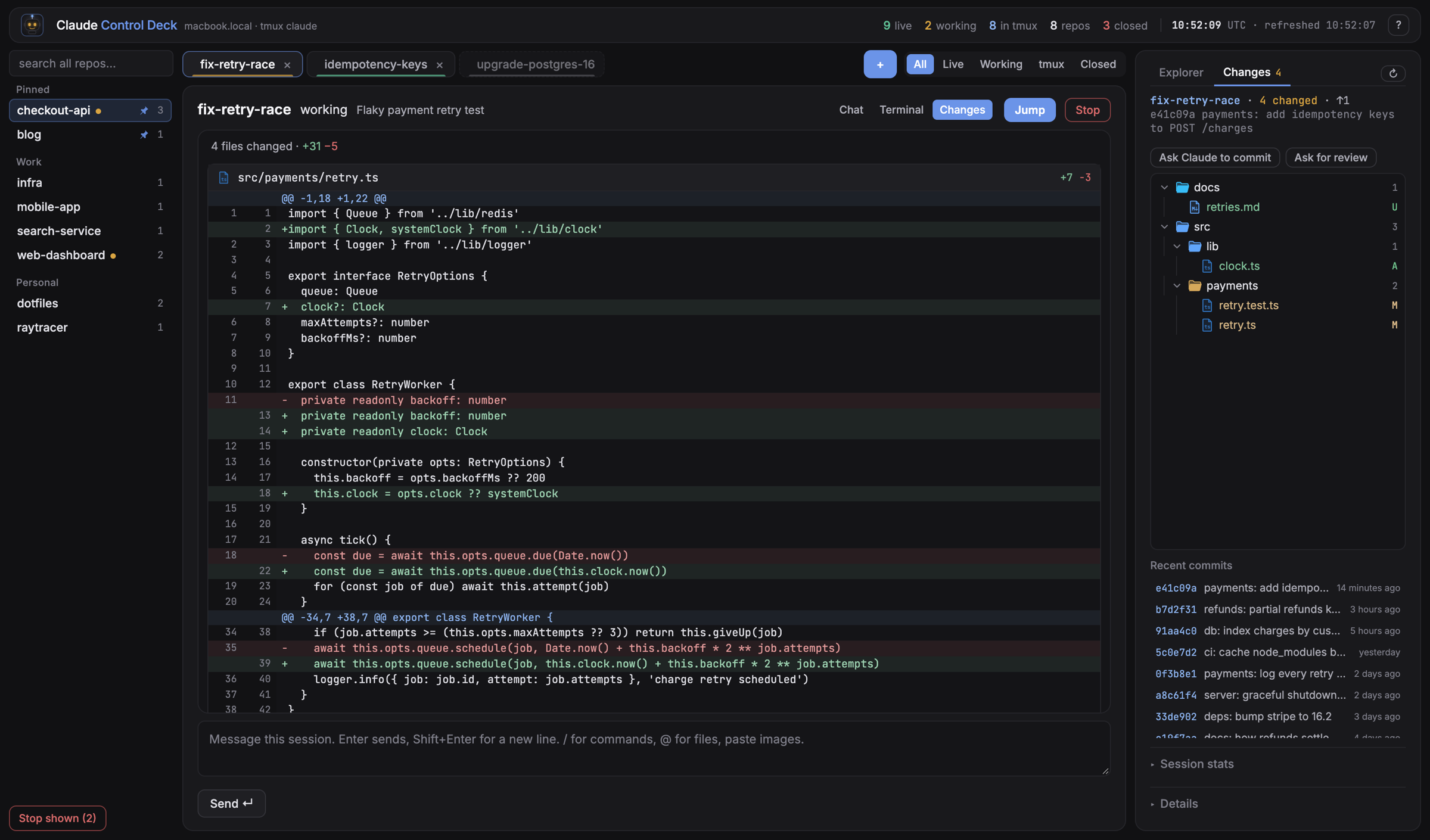
- Changes. Every file the session touched, stacked like a GitHub pull request. Two buttons send “review this” or “commit this” straight to the session.
Under it is a message box that behaves like the real prompt. / completes commands and skills, @ completes files, and a pasted screenshot shows up in the session as [Image #1], same as pasting in the terminal. That one is a small hack: the image goes onto the macOS clipboard, then tmux sends ctrl+v.
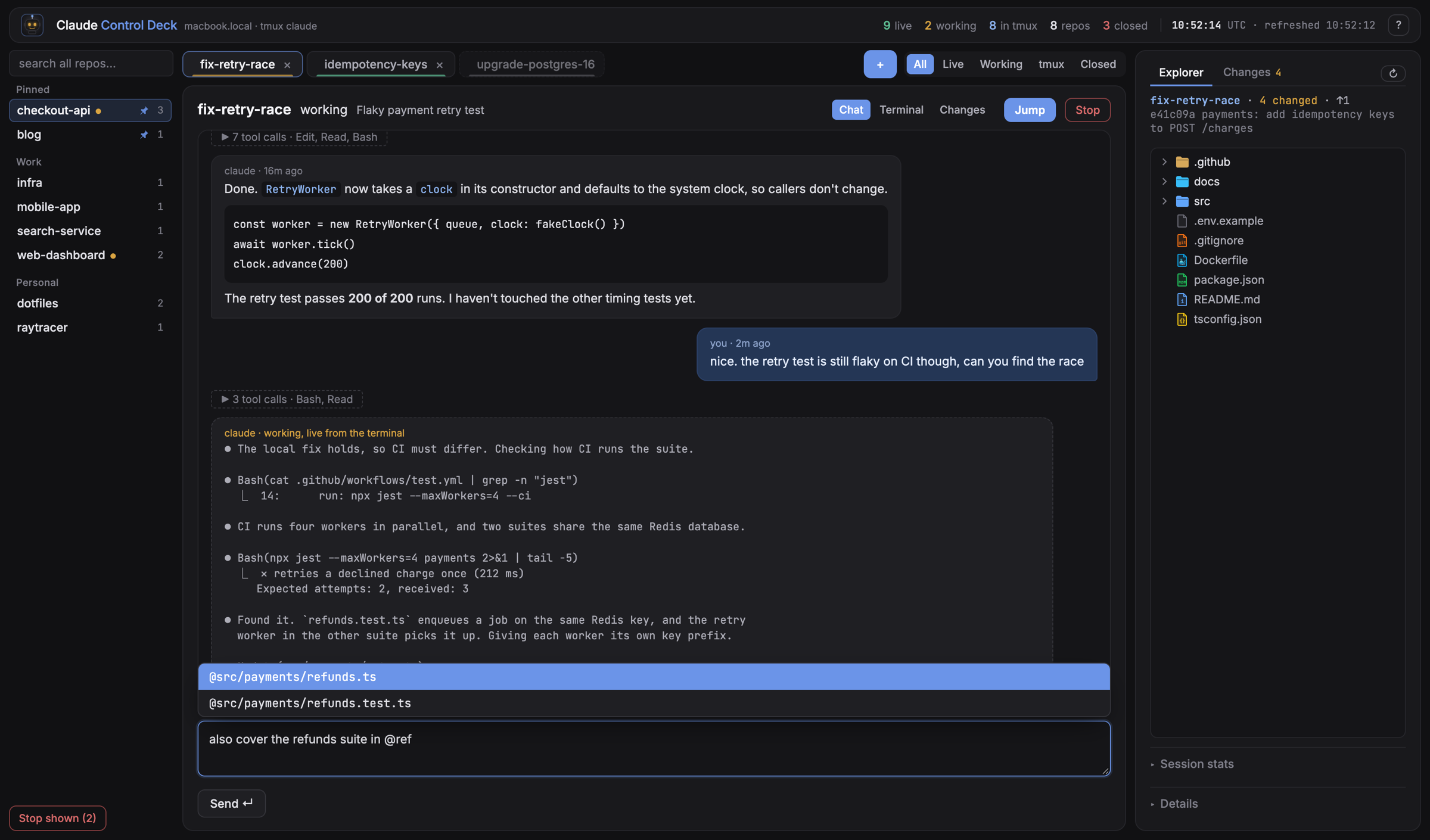
@ completes files from the repo.It’s all keyboard driven. Up and down move between repos, left and right between sessions, Enter to type, n for a new session, d for the diff, g to jump to the real terminal.
How little it needs
It’s three files. A Python collector, a Python server using only the standard library, and one HTML page with no build step. No plugin, no API key, nothing changed in Claude Code.
The one fiddly part is matching a Claude process to its tmux window. The collector walks up the process tree from each Claude process until it hits a shell that tmux owns. My first version ran ps twice per session on every refresh, and a refresh took 0.9 seconds. One ps for the whole machine, plus caching transcripts on their size and modified time, brought it down to 0.19.
The bug I almost shipped
This is the part I’d most like other people building local tools to read.
The server only listens on 127.0.0.1, so I assumed it was private. It isn’t. Any website open in your browser can send a request to http://127.0.0.1:8766. If it’s a “simple” request, a POST with a text/plain body, the browser sends it without asking. The page can’t read the response, but it doesn’t need to.
My send endpoint parsed any body as JSON and typed it into a terminal. A few of my sessions run in auto mode. So any page I visited could, in principle, have typed instructions into a Claude session with access to my code.
I found it while getting the deck ready to publish, by sending exactly that request with curl and watching it go through. The fix is four checks:
- Reject any request whose
Hostisn’t the deck. This stops DNS rebinding, where a page points its own domain at127.0.0.1. - Reject any
Originthat isn’t the deck. - Reject cross-site fetch metadata.
- Require a custom
X-Deckheader and a JSON body on every write. Browsers won’t send those across origins without a preflight, and the server never approves one.
If you have a local dev tool that does anything on a POST, try the curl test on it.
Building it with the thing it manages
I built the deck by talking to a Claude Code session, which was running inside the same tmux the deck was reading. Partway through, I closed that session’s terminal and revived it from the deck it had just built. It came back with its whole history and carried on.
Most of the work was me saying what bothered me in plain words and it changing the page. “The chat jumps to the bottom while I’m reading.” “Too sharp on the eye.” “Show changes like a GitHub PR.” The useful part was noticing what got in my way, not writing CSS.
Try it
The live demo is the real interface running on made-up sessions, right in your browser. Click around, open the Changes tab, send it a message.
To run it on your own sessions you need macOS, tmux, Python 3.9+ and Claude Code. Clone it, run ./deck.sh, and your sessions show up. Start new ones with cc so the deck can talk to them.
One caveat: the files it reads are Claude Code internals, not a public API, so an update can break parts of it.
If you run a lot of agents in parallel, I’d like to hear how you keep track of them.